Offline AIon a USB.
Plug it into any Windows or Mac laptop. Voice, vision, and chat run locally on your hardware, no cloud, no login, no subscription.
Three ways in from $69: go digital on your own drive ($69), or go ready-to-run, most pick v1.8.0 ($99). Want offline GPS too? The PRO Navigator adds it for $199.
Now shipping Firmware 1.8.0, the advanced SCOUT with 7 field modes, faster performance, smarter hardware use. What's new →
Live US grid pressure from public EIA data. When the grid strains, an offline AI on a USB keeps working. This is the world PortableMind is built for.
Real people running it
Unscripted demos and reviews from TikTok, not us, them.
Showing 4 of 16 · Real users, real demos
Real frames from the PortableMind desktop app
Not mockups, not renders, the actual desktop app you get when you plug the USB in.
Ask anything, fully offline
- ›Multiple model sizes, from fast-and-light to high-power
- ›Saved threads, or an Ephemeral mode that keeps nothing
- ›One-tap Simplify, Checklist, and Summarize
Real frames from the PortableMind desktop app. The SCOUT tab is a live Firmware 1.8.0 recording of the new field modes; the other clips are from an earlier build with unchanged surfaces. Click the tabs to look around.
Meet the PRO Navigator
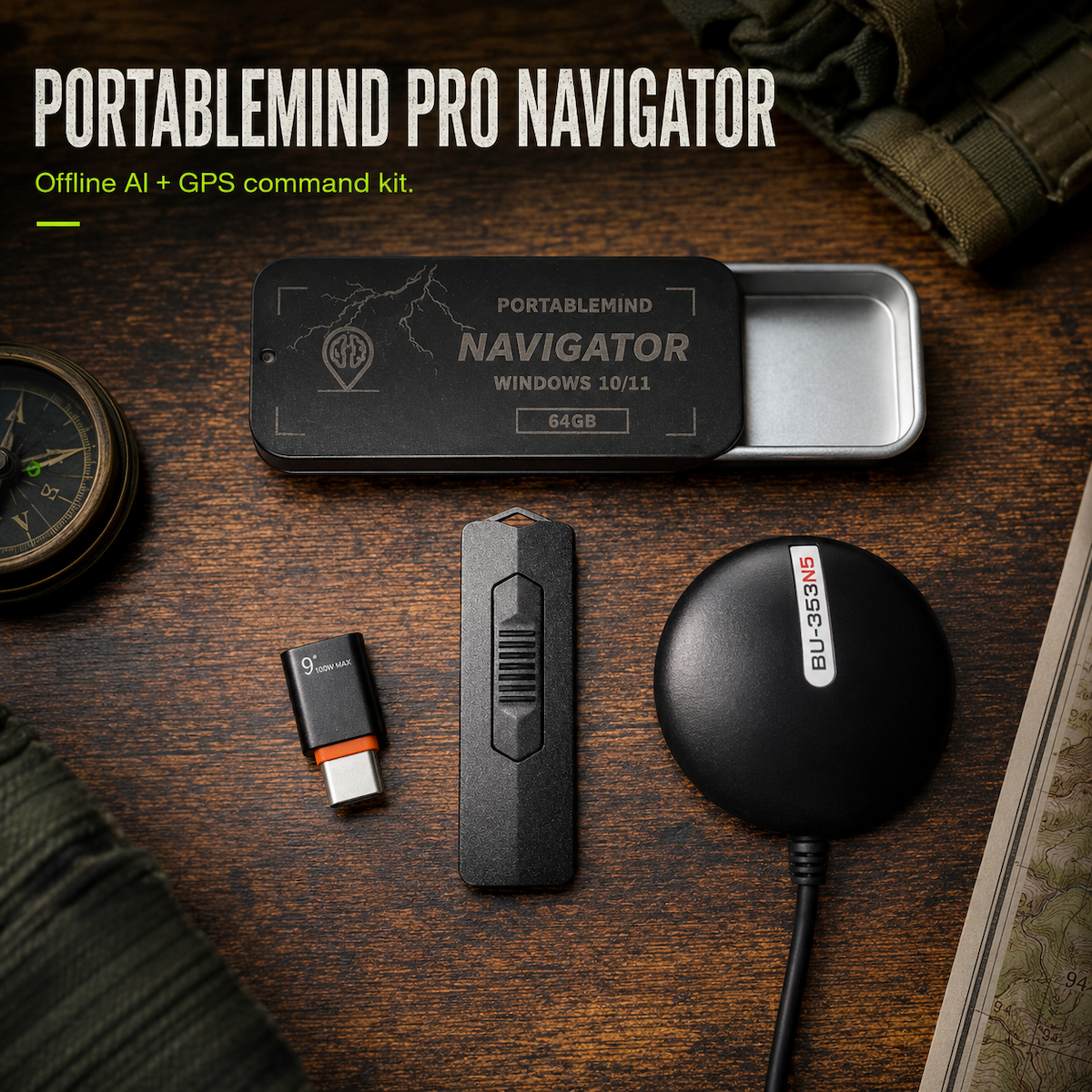
Everything PortableMind does, chat, voice, vision, now with a full offline US GPS: turn-by-turn routing and ~258M addresses, working with zero signal. Ships with a USB GPS receiver in the box.
The official Updater is live
Bring your PortableMind up to the latest version with one download. The Updater refreshes your existing USB in place, and your conversations are preserved automatically. Free for every customer, and completely optional: your drive keeps working exactly as it is, whether you update or not.
Three tiers. One offline AI.
Pick the tier that matches your needs. All include Firmware 1.8.0 with voice, the advanced SCOUT Vision (7 field modes), multi-modal chat, phone access, and the in-app Model Manager. Windows and macOS support available on v1.8.0 and MAX-SPEED. DIGITAL flashes a 64 GB+ drive you already own, nothing ships.
DIGITAL
- Full v1.8.0 feature set
- Your own 64 GB+ USB 3.0 drive
- Instant setup key, no shipping
- Official Updater does the setup
v1.8.0
- Windows + macOS
- Voice mode
- SCOUT field modes
- Model Manager
MAX-SPEED v1.8.0
- Everything in v1.8.0
- 400 MB/s drive
- Faster boot + switching
- Windows + macOS
// Secure checkout via Stripe. Taxes and shipping calculated at checkout.
// Operator feedback
4.9 · 84 reviews
Real feedback from operators running PortableMind offline in the field, at home, and in the library.
See all reviews →“My computer was giving me problems with it. I sent an email and RECEIVED A CALL. It was the creator/tech person. He dropped everything to help me. Customer service is OUTSTANDING, ive not seen such great customer service since the 90s ,If you're thinking about getting this, DO IT. Its worth it.”
“Device is perfect. Having your own fully functional AI in your pocket is remarkable. No limits with this device. If there's a disaster and you use this is going to help guide you. You can sleep better with one of these.”
AI that doesn't depend on a connection
No cloud, no outage
Cloud AI dies the moment the signal does. PortableMind runs on the machine in front of you, on a plane, off-grid, or in the middle of an outage.
Private by default
Your conversations, documents, and voice never leave your hardware. No telemetry, no uploads, no account to create.
Pay once, own it
One USB, one payment. No subscription to cancel, no model quietly nerfed. It keeps working whether or not you ever update again.
Voice, vision, and a real desktop app
Firmware 1.8.0 ships a massively advanced SCOUT Vision: seven field scan modes (General, Plant ID, Mushroom, Bug, Tracks, First Aid, Read Text), each returning a structured triage card with key markers, dangerous lookalikes, confidence ratings, and safety-first verdicts. The whole runtime also got faster, uses your hardware more fully, and adapts to your machine in real time. All local, all private.
SCOUT Field Modes
SCOUT is no longer one generic vision box. Pick a dedicated scan mode, General, Plant ID, Mushroom, Bug, Tracks, First Aid, or Read Text, and get an answer structured for that exact job, entirely offline.
Fine-Tuned Vision
The vision stack behind SCOUT got a major fine-tuning pass. Identifications are sharper and every scan states its confidence plainly, with an explicit "if this ID is wrong" risk line so you always know the stakes.
Faster Performance
A performance pass across the whole runtime. Chat, voice, and SCOUT all respond faster, model loads and switches are snappier, and the app feels lighter on the same hardware you already own.
Better Utilization + Smart Adaptation
The runtime now makes fuller use of the VRAM and CPU you actually have, and continuously adapts model routing, context sizing, and workload placement to your machine and what you're doing, no config needed.
Bug-Squashing Pass
A deep stability sweep across the codebase. Crash fixes, leak fixes, and cleaner error recovery in chat, voice, and SCOUT, so the runtime shrugs off the edge cases that used to trip it up.
Everything from 1.7
Model Manager, the Qwen 3.5 roster, multi-modal chat, GPU-accelerated voice, Phone Access, thread history, AES-hardened import/export, and the offline Field Manual all remain intact. Nothing was removed to make room.
Built-in field manual
Six categories of grid-down reference ship on every drive, browsable offline with zero AI calls. Tap Ask AI about this when you want the model to walk you through your exact situation.
Want a permanent desk setup? The Survival Terminal is the same offline brain, hand-built into a dedicated box. Released in small runs.
View Terminal →Common questions
Does it really work offline?+
What do I need to run it?+
Is there a subscription or API key?+
What can it actually do?+
What's the difference between the tiers?+
The Offline Readiness Field Guide.
Six fact-checked sections covering power, water, comms, offline AI, navigation, and first aid, with the exact numbers most people get wrong and the survival myths that get people hurt. Sourced to CDC, EPA, FEMA & NIST, and yours as a polished, print-ready PDF.
Free PDF, plus firmware drops and the occasional subscriber-only discount. No spam, unsubscribe anytime.
Offline AI. Ready the moment you plug in.
One USB, one payment. Voice, vision, chat, and phone access, running locally on your hardware, with no cloud to depend on.
[ ORDER FROM $69 ]