PortableMind Firmware 1.8.0: SCOUT Learns the Field
Point a camera at a white mushroom and ask a chatbot if you can eat it. Most will describe it, some will guess, and none of them should be trusted with your liver. Firmware 1.8.0 is our answer to that problem. SCOUT, the vision system on every PortableMind USB, now has seven dedicated field scan modes, and every scan comes back as a structured triage card: a verdict up top, the markers that drove it, the deadly lookalikes, an honest confidence rating, and a plain statement of what happens if the ID is wrong. It runs on the drive in your hand, with zero internet, and it is shipping on every unit going out the door right now.
TL;DRFirmware 1.8.0 rebuilds SCOUT around seven field scan modes with structured, danger-first triage cards and honest confidence ratings, makes the whole runtime faster and more adaptive, and squashes a season of bugs. Free update for existing owners, preloaded on every new drive.
The headline: SCOUT is now a field instrument
Every firmware release has a center of gravity. In 1.6 it was the Model Manager. In 1.7 it was the Qwen 3.5 roster and multi-modal chat. In 1.8.0 it is SCOUT, and the change is not a polish pass. It is a rebuild of what the vision system is for.
The old SCOUT was one box: drop in an image, get a description. Useful, but generic. The new SCOUT asks you what job you are doing first, then scans like a specialist. Identifying a plant is not the same task as reading a label, and triaging a mushroom is not the same task as identifying a spider. Now each of those gets its own mode, its own output structure, and its own safety rails.
Seven modes, one scan button
Open SCOUT in 1.8.0 and a mode strip sits above the scan button. Pick the job, load the image, hit SCAN. That is the whole workflow.
Together the modes cover the field jobs people actually reach for a camera to do: offline AI plant identification, mushroom triage, bug and spider ID, track reading, first-aid triage, and straight document OCR, with no signal required for any of it.
- Each mode accepts optional context: gill color, spore print, where it was growing, how big.
- Scan history is kept per session with timestamps, so you can compare finds.
- Everything renders in the same terminal UI you already know, one CLEAR button away from a fresh slate.
Anatomy of a triage card
The output format is the real invention. Instead of a paragraph you have to interpret, every scan returns the same structured card, and the card leads with the only line that matters in the field: the verdict.
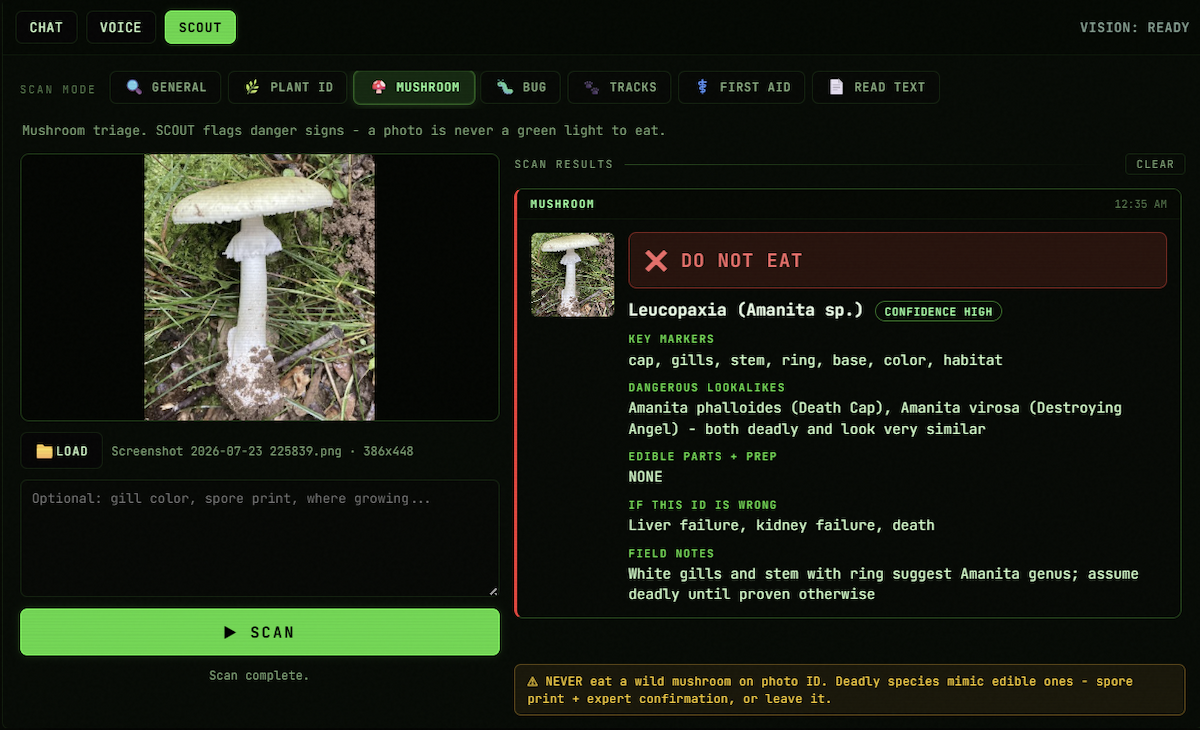
Here is the exact shape, using the scan that convinced us to build Mushroom mode:
- Key markers
- Cap, gills, stem, ring, base, color, habitat
- Dangerous lookalikes
- Amanita phalloides (Death Cap), Amanita virosa (Destroying Angel). Both deadly and look very similar.
- Edible parts + prep
- NONE
- If this ID is wrong
- Liver failure, kidney failure, death
- Field notes
- White gills and stem with ring suggest Amanita genus; assume deadly until proven otherwise
- Verdict first: DO NOT EAT, CAUTION, HARMLESS, or EDIBLE, color-coded and impossible to miss.
- Key markers show the evidence, so you can check the reasoning against the actual specimen.
- Dangerous lookalikes name the species that kill people who guess.
- The confidence badge is honest: when SCOUT is not sure, it says so, in writing.
- "If this ID is wrong" states the stakes in plain language. No other consumer AI we know of does this.
Real scans from the release build
These are not mockups. All three of these are screenshots of Firmware 1.8.0 running on a stock PortableMind, Wi-Fi off, taken the night before this post went up.
First, the one that matters most. A pale, ringed, white-gilled mushroom growing in grass. The single most dangerous genus a beginner can meet, and SCOUT treats it that way:
The other direction matters too
A safety system that screams danger at everything teaches you to ignore it. So SCOUT is calibrated to clear things that are actually fine, and to say why.
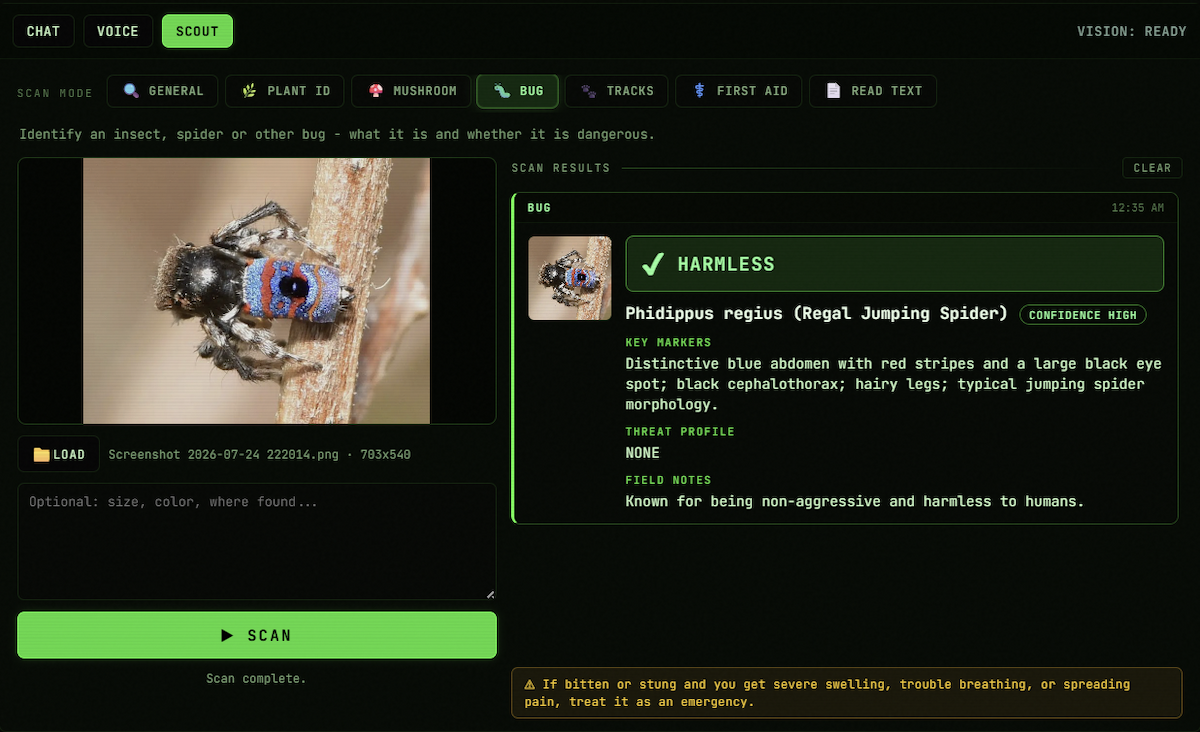
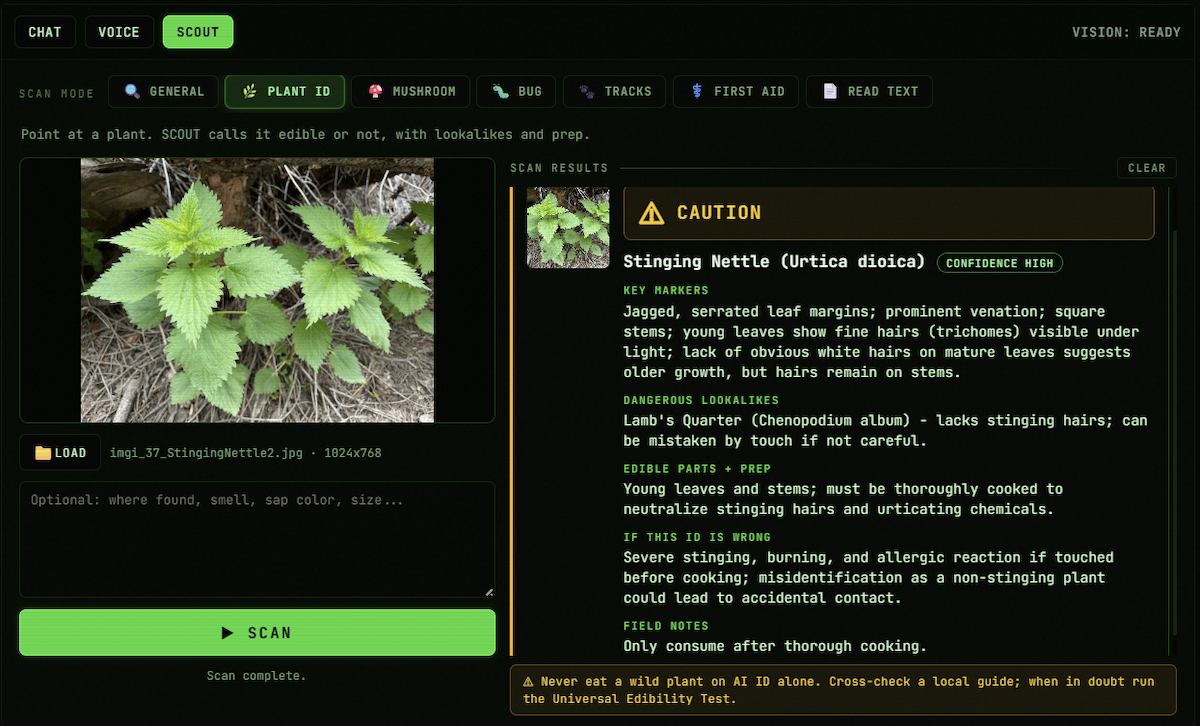
A regal jumping spider gets HARMLESS with high confidence, the markers that identify it, and a threat profile of NONE. A stinging nettle gets CAUTION, because it genuinely hurts to grab, along with the note that it becomes edible after thorough cooking, and the lookalike that fools people by touch.
The safety spine
Every identification mode carries a permanent safety strip, and the rules are hard-coded, not vibes. Mushroom mode will not issue an eat verdict from a photo, full stop. Plant ID tells you to cross-check a local guide. First Aid tells you when a symptom means emergency services, not an AI. The model is fine-tuned to lead with danger signs, and white-gilled, ringed mushrooms are assumed deadly until proven otherwise.
We built it this way because the failure mode of a confident wrong answer in this domain is not embarrassment. It is a hospital. An honest instrument tells you what it sees, how sure it is, and what it costs you if it is wrong. That is the whole design philosophy of 1.8.0 in one sentence.
A photo is never a green light to eat. SCOUT's job is to flag danger signs fast, not to talk you into a meal.The rule printed inside Mushroom mode
Faster, fuller, adaptive
SCOUT is the headline, but the whole runtime moved. 1.8.0 carries a performance pass across chat, voice, and vision: faster inference, snappier model loads, less waiting between turns.
Under that sits the utilization work. The runtime now uses more of the hardware you actually have, filling available VRAM and CPU threads instead of leaving headroom idle. And it adapts live: model routing, context sizing, and workload placement track your machine in real time, so the same drive runs right on a tired 8 GB laptop and a big desktop GPU without you touching a setting.
- Faster inference across chat, voice, and SCOUT scans.
- Fuller use of available VRAM and CPU threads.
- Routing, context size, and workload placement adjust to your machine in real time.
- Zero configuration. The drive reads the hardware and does the right thing.
And a season of bug squashing
1.8.0 also closes out a deep stability sweep: crash fixes, leak fixes, and cleaner recovery from transient errors across the chat, voice, and SCOUT pipelines. Everything from the 1.7.1 hardening line, the TTS mutex coverage, the stream timeouts, the low-VRAM retry logic, carries forward intact. Nothing was removed to make room.
How to get 1.8.0
New drives: nothing to do. Every PortableMind shipping now leaves preloaded with 1.8.0.
Existing owners: the official Updater brings your USB to the latest version in one download. It is free, it is optional, and your conversations are preserved automatically. Windows-based units first; the macOS updater is coming and we will announce it.
And if you want a feel for the modes before any of that, the browser demo mirrors all seven as a live preview, right on this site.
Ready to run AI offline?
PortableMind is the plug-and-run offline AI USB. Go Digital for $69 and flash your own drive, or get the $99 v1.8.0 USB (voice, SCOUT Vision field modes, multi-modal chat, in-app Model Manager) or MAX-SPEED for power users. No internet, no subscription.
Conclusion
Firmware 1.8.0 is the release where SCOUT grew up. Seven field modes, structured triage cards, honest confidence, and a safety spine that treats a wrong answer as the emergency it would be. Wrapped around it: a faster runtime that uses your hardware fully and adapts to it live. It is on every new drive today, and one free download away for everyone else.
Read the full 1.8.0 release notesFrequently asked questions
Long-tail answers for the search queries around this topic.
- What are SCOUT field modes?
- Seven dedicated scan modes in PortableMind Firmware 1.8.0: General, Plant ID, Mushroom, Bug, Tracks, First Aid, and Read Text. Each returns a structured triage card with a verdict, key markers, dangerous lookalikes, a confidence rating, and field notes, all generated offline on the USB.
- Can SCOUT really identify mushrooms offline?
- SCOUT runs mushroom triage fully offline and leads with danger signs, deadly lookalikes, and an explicit statement of the stakes. It will never green-light eating a wild mushroom from a photo. Definitive mushroom ID requires a spore print and expert confirmation, and SCOUT says exactly that on screen.
- Does SCOUT need internet for any of this?
- No. The vision models, the fine-tuning, and the triage logic all live on the USB and run on your machine. Airplane mode, dead zone, or grid-down, the scans work the same.
- Is the 1.8.0 update free for existing owners?
- Yes. Download the official Updater at portablemind.io/update, plug in your drive, and it brings the USB to the latest version with your conversations preserved. Free for every customer, and fully optional.
- Which tiers get the new SCOUT?
- SCOUT field modes ship on every tier with vision: v1.8.0, MAX-SPEED, and the PRO Navigator. CORE is the chat-only Windows tier and does not include vision. Current prices for every tier are on the buy page.
- What else is in Firmware 1.8.0 besides SCOUT?
- A performance pass across chat, voice, and vision, fuller use of your VRAM and CPU, real-time adaptation of model routing and context sizing to your hardware, and a deep stability sweep on top of the 1.7.1 hardening line.
- Should I trust an AI to tell me what is safe to eat?
- No, and SCOUT is built around that answer. It is a triage instrument: it flags danger fast, names the lookalikes, states its confidence, and tells you the cost of being wrong. For anything you plan to eat, it points you to spore prints, local guides, and expert confirmation.
Carson Dresser created the first offline AI USB. He builds from South Florida, where hurricane season makes losing power a lived reality rather than a thought experiment, and he watched cloud AI fail people at the worst possible moments: locked accounts, surprise price hikes, assistants that vanish with the signal. In 2025 he decided intelligence should be something you own, and shipped it. Working alone, he engineered the firmware, tuned the local models, wrote the desktop app, and built the over-the-air update system that delivers cryptographically signed payloads to drives already in the field. He also designed the product, built this website, and runs the store, the kind of range that usually takes a company. Before PortableMind he built ClipStitcher and a stack of practical automations for creators and small operators. Every order that ships and every support email still goes through Carson personally.